This chapter describes the configuration fundamentals for IOS and ASA-based firewalls, highlighting the similarities between the product families.
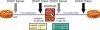
Having already studied the static and PPPoE methods of addressing, now look at the services provided by the classic DHCP Protocol. Figure 3-11 portrays a sample topology for the study of DHCP Server and Client functionalities. Example 3-33 shows an IOS router configured as DHCP server while ASA acts as a client (on its outside interface). The address assigned to ASA in this case is 172.16.200.41.
Example 3-34 also relates to the topology of Figure 3-11 and teaches how to enable the DHCP server function on ASA. The dhcpd auto_config option enables ASA to forward the parameters it receives on a given interface (as client) to another interface where it works as a server. The show running-config dhcpd command displays the configuration related to the DHCP daemon on ASA. (Notice that the auto_config attributes are shown on the running-config.) This example includes the summary information for DHCP services enabled on ASA and the lease information visible on an IOS client.
Figure 3-11 Reference Topology for DHCP Server and DHCP Client
! Router "OUT" acts as DHCP Server for subnet 172.16.200.0/24 interface FastEthernet4.200 encapsulation dot1Q 200 ip address 172.16.200.200 255.255.255.0 ! ip dhcp excluded-address 172.16.200.1 172.16.200.40 ip dhcp excluded-address 172.16.200.50 172.16.200.255 ! ip dhcp pool OUT1 network 172.16.200.0 255.255.255.0 default-router 172.16.200.200 dns-server 172.16.250.250 domain-name outside.net ! ! ASA configured as a DHCP client on interface outside ASA5505(config)# interface vlan 200 ASA5505(config-if)# ip address dhcp setroute %ASA-6-302015: Built outbound UDP connection 46 for outside:255.255.255.255/67 (255.255.255.255/67) to identity:0.0.0.0/68 (0.0.0.0/68) %ASA-6-604101: DHCP client interface outside: Allocated ip = 172.16.200.41, mask = 255.255.255.0, gw = 172.16.200.200 %ASA-6-302016: Teardown UDP connection 46 for outside:255.255.255.255/67 to identity:0.0.0.0/68 duration 0:02:03 bytes 1096 ! ! The DHCP-learned default route becomes visible on ASA's routing table ASA5505# show route outside | begin Gateway Gateway of last resort is 172.16.200.200 to network 0.0.0.0 C 172.16.200.0 255.255.255.0 is directly connected, outside d* 0.0.0.0 0.0.0.0 [1/0] via 172.16.200.200, outside ! ASA5505# show interface ip brief | include DHCP|Method Interface IP-Address OK? Method Status Protocol Vlan200 172.16.200.41 YES DHCP up up ! ! Viewing information about the DCHP Server function OUT# show dhcp server DHCP server: ANY (255.255.255.255) Leases: 2 Offers: 1 Requests: 1 Acks : 1 Naks: 0 Declines: 0 Releases: 3 Query: 0 Bad: 0 DNS0: 172.16.250.250, DNS1: 0.0.0.0 Subnet: 255.255.255.0 DNS Domain: outside.net
! Displaying dhcpd configuration on ASA ASA5505# show running-config dhcpd dhcpd auto_config outside **auto-config from interface 'outside' **auto_config dns 172.16.250.250 **auto_config domain outside.net ! dhcpd address 172.16.201.60-172.16.201.69 dmz dhcpd enable dmz ! ! Summary information about DHCP Services enabled on ASA ASA5505# show dhcpd state Context Configured as DHCP Server Interface mgmt, Not Configured for DHCP Interface dmz, Configured for DHCP SERVER Interface outside, Configured for DHCP CLIENT ! ! Displaying information about the DHCP lease on the IOS client DMZ# show dhcp lease Temp IP addr: 172.16.201.60 for peer on Interface: FastEthernet4.201 Temp sub net mask: 255.255.255.0 DHCP Lease server: 172.16.201.2, state: 5 Bound DHCP transaction id: 1E88 Lease: 3600 secs, Renewal: 1800 secs, Rebind: 3150 secs Temp default-gateway addr: 172.16.201.2 Next timer fires after: 00:17:52 Retry count: 0 Client-ID: cisco-0014.f2e3.7df6-Fa4.201 Client-ID hex dump: 636973636F2D303031342E663265332E 376466362D4661342E323031 Hostname: DMZ ! ! The default route learned through DHCP is visible on the IOS routing table DMZ# show ip route | begin Gateway Gateway of last resort is 172.16.201.2 to network 0.0.0.0 172.16.0.0/24 is subnetted, 1 subnets C 172.16.201.0 is directly connected, FastEthernet4.201 S* 0.0.0.0/0 [254/0] via 172.16.201.2
Figure 3-12 represents a sample topology used for the investigation of the DHCP Relay feature. When acting as a DHCP Relay, a Layer 3 device (a router or a network firewall, for instance) converts broadcast packets from clients into unicast packets destined to a DHCP server located on a different subnet. The Relay receives replies from the servers and forwards them back to the originating client.
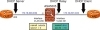
Figure 3-12 Reference Topology for Analysis of DHCP Relay Operation
Example 3-35 refers to the internetwork of Figure 3-12, where ASA relays DHCP packets from clients that reside on interface dmz (subnet 172.16.201.0/24) to the server 172.16.200.200, reachable through the outside interface. It is interesting that there is a pool configured on the server (OUT router) that offers addresses belonging to the 172.16.201.0/24 subnet. (In the example, the DMZ router receives the address 172.16.201.51/24.)
! ASA acts as a DHCP Relay that points to server 172.16.200.200 ASA5505# show running-config dhcprelay dhcprelay server 172.16.200.200 outside dhcprelay enable dmz dhcprelay setroute dmz dhcprelay timeout 60 ! ! Enabling the DHCP Client on IOS DMZ(config)# interface f4.201 DMZ(config-subif)#ip address dhcp DHCP: DHCP client process started: 10 RAC: Starting DHCP discover on FastEthernet4.201 DHCP: Try 1 to acquire address for FastEthernet4.201 [ output suppressed] B'cast on FastEthernet4.201 interface from 0.0.0.0 DHCP: Received a BOOTREP pkt DHCP: offer received from 172.16.200.200 [ output suppressed] Allocated IP address = 172.16.201.51 255.255.255.0 %DHCP-6-ADDRESS_ASSIGN: Interface FastEthernet4.201 assigned DHCP address 172.16.201.51, mask 255.255.255.0, hostname DMZ DHCP Client Pooling: ***Allocated IP address: 172.16.201.51 ! ! Viewing the IP Addresses obtained through DHCP DMZ# show ip interface brief | include DHCP|Method Interface IP-Address OK? Method Status Protocol FastEthernet4.201 172.16.201.51 YES DHCP up up ! ! DHCP Relay messages on ASA DHCPD: Relay msg received, fip=ANY, fport=0 on dmz interface DHCPD: setting giaddr to 172.16.201.2. dhcpd_forward_request: request from 0063.6973.636f.2d30.3031.342e.6632.6533.2e37.6466.362d.4661.342e.3230.31 forwarded to 172.16.200.200. DHCPD/RA: Punt 172.16.200.200/17152—> 172.16.201.2/17152 to CP DHCPD: Relay msg received, fip=ANY, fport=0 on outside interface DHCPRA: forwarding reply to client 0063.6973.636f.2d30.3031.342e.6632.6533.2e37.6466.362d.4661.342e.3230.31. DHCPD: Relay msg received, fip=ANY, fport=0 on dmz interface DHCPD: setting giaddr to 172.16.201.2. ! ! Summary information about DHCP Relay function on ASA ASA5505# show dhcprelay state Context Configured as DHCP Relay Interface mgmt, Not Configured for DHCP Interface dmz, Configured for DHCP RELAY SERVER Interface outside, Configured for DHCP RELAY
